Sending an airdrop means paying a list of wallets at once instead of one at a time. Runitup has a page for it, and this guide walks through that page screen by screen, using real pictures of the thing you will actually see.
No code and no spreadsheet gymnastics. You paste a list of addresses, say how much to send, and confirm in your wallet. Any token works, including one you launched here, and so does plain ETH.
Before you start, two honest notes. Transfers cannot be undone, so the list matters more than anything else in this guide. And one part of the page, the claim option, is not switched on yet, which we will come to.

What an airdrop actually is
An airdrop is a payment to many wallets in one go. People use them to reward early holders, to pay a community for something, to seed a new coin into circulation, or to say thank you after a launch.
The word sounds technical and is not. If you have ever sent a token to a friend, an airdrop is that, repeated across a list, without you typing each address by hand.
What it is not is free money appearing from nowhere. The tokens come out of your wallet. You are paying, and the page is simply saving you from doing it five hundred times.
What an airdrop actually costs
There are two costs, and only one of them is obvious.
The obvious one is the tokens. Whatever total you put in the box leaves your wallet and does not come back. If you are airdropping a coin you launched, that supply is now in other people's hands and some of it will be sold.
The less obvious one is gas. Every transfer is a transaction, and every transaction costs a small fee in ETH. On these chains that fee is small, but an airdrop to two hundred wallets is two hundred of them, and small multiplied by two hundred stops being small.
Work it out before you start rather than discovering it at wallet confirmation number ninety. Take the current gas cost of one simple transfer, multiply it by the number of people on your list, and decide whether the airdrop is worth that number. Usually it is. Occasionally it tells you the list is too long.
Funding the airdrop from fees
One tidy option if you launched the coin here: the trading fees your coin has already earned can fund the airdrop. You are then giving away something the coin generated rather than dipping into your own balance.
That also makes a better story than a plain giveaway. "The coin earned this and it went back to holders" is a sentence people repeat, and an airdrop that people talk about is doing two jobs at once.
Whatever you fund it from, keep the amount proportionate. An airdrop is meant to thank people or bring them in. Handing out a quarter of the supply to do it usually achieves the opposite, because everyone who received it sells into the same thin pool on the same afternoon.
Where the list of addresses comes from
The page assumes you already have a list, which is fine if somebody handed you one and unhelpful if you are staring at an empty box. There are three usual sources.
The first is your own records. If people signed up, entered something, or completed a task, you already collected their addresses and the list is done.
The second is holders of your coin. Every token's holders are public, so you can read them off a block explorer and export the list. This is how "reward everyone who held on day one" gets done, and it is worth deciding your cut-off before you look rather than after.
The third is a snapshot someone took for you at a particular moment. A snapshot is just a saved copy of who held what at a given block. It matters because holders change by the hour, and without a fixed moment the list argues with itself.
Trimming the list before you send
Whichever source you use, cut it down before sending. Remove your own wallets unless you meant to include them. Remove any contract address that is not a person, because a token sent to a contract that cannot handle it is gone.
It is also worth removing the dust. If your list has two hundred wallets holding a meaningful amount and four hundred holding a token each from a previous airdrop, paying all six hundred triples your effort to reach the same people.
A shorter, deliberate list beats a long automatic one. It costs less gas, takes fewer confirmations, and the people on it are more likely to care.
Step one: open the page and pick a chain
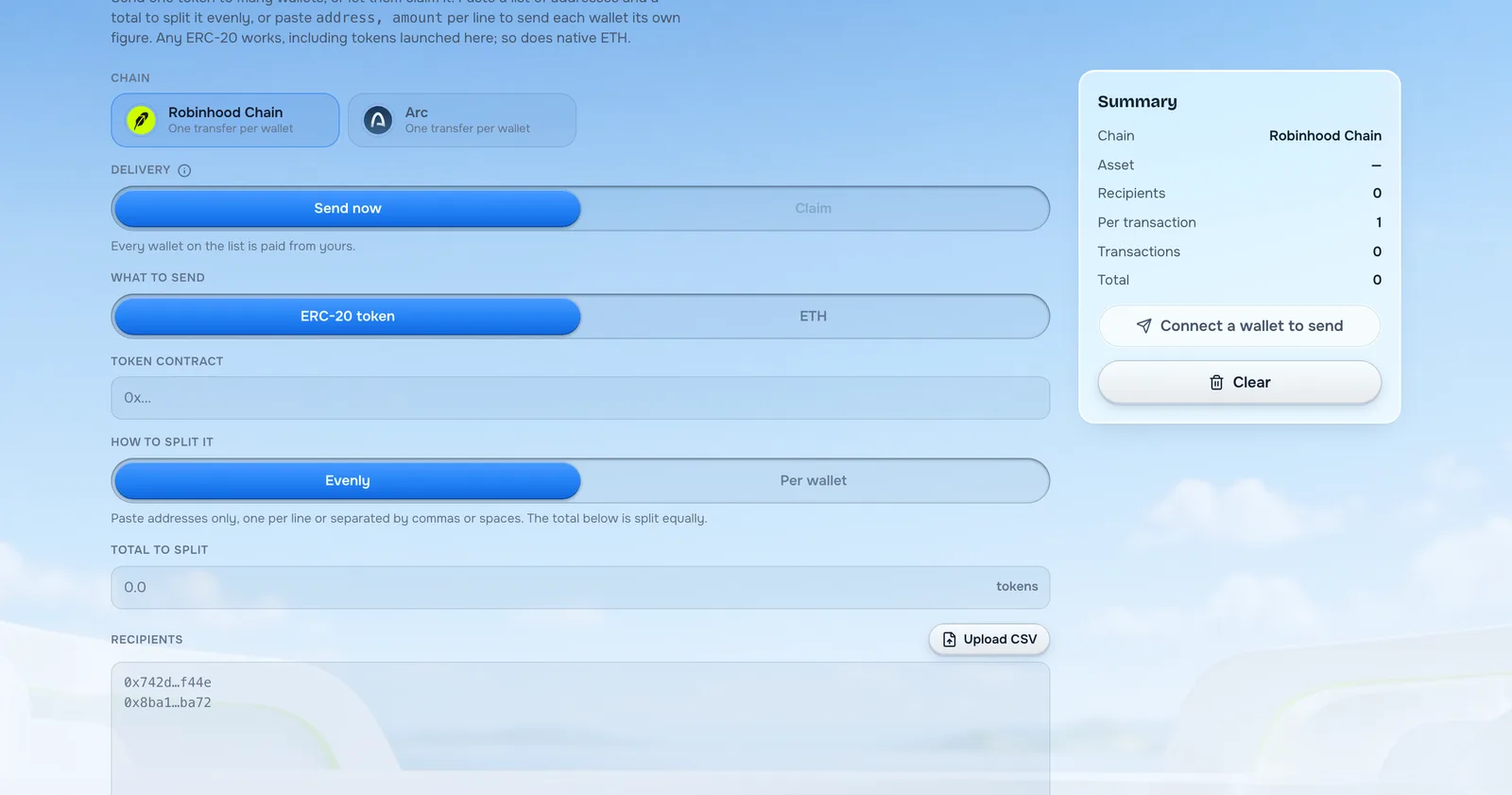
Go to the airdrop page and choose which chain you are sending on. Runitup supports Robinhood Chain and Arc, and your tokens have to already exist on the chain you pick.
That is worth pausing on. If your coin lives on Robinhood Chain and you select Arc, nothing good happens, because the token is not there. Pick the chain your coin was launched on.
Underneath each chain name the page tells you how it will send: at the moment both read "one transfer per wallet", and the next section explains exactly what that costs you.
Step two: choose how it is delivered
There are two delivery methods, and today only one of them is available.
Send now pays every wallet on the list straight from yours. You press confirm, the tokens move, and the recipients do not have to do anything at all. They wake up and it is there.
Claim is the other model, where you put the whole amount into a contract and each wallet comes and collects its own share. It is greyed out on the page right now, and hovering it says claim airdrops are not on Robinhood Chain yet. So for this guide, we are sending now.
Both are worth understanding, because they put the cost in different places. Sending pays everyone whether they wanted it or not, and you pay all the gas. A claim airdrop makes each person pay their own gas to collect, which filters out the wallets that were never interested.
Step three: say what you are sending
Pick either an ERC-20 token or ETH.
Sending an ERC-20 token
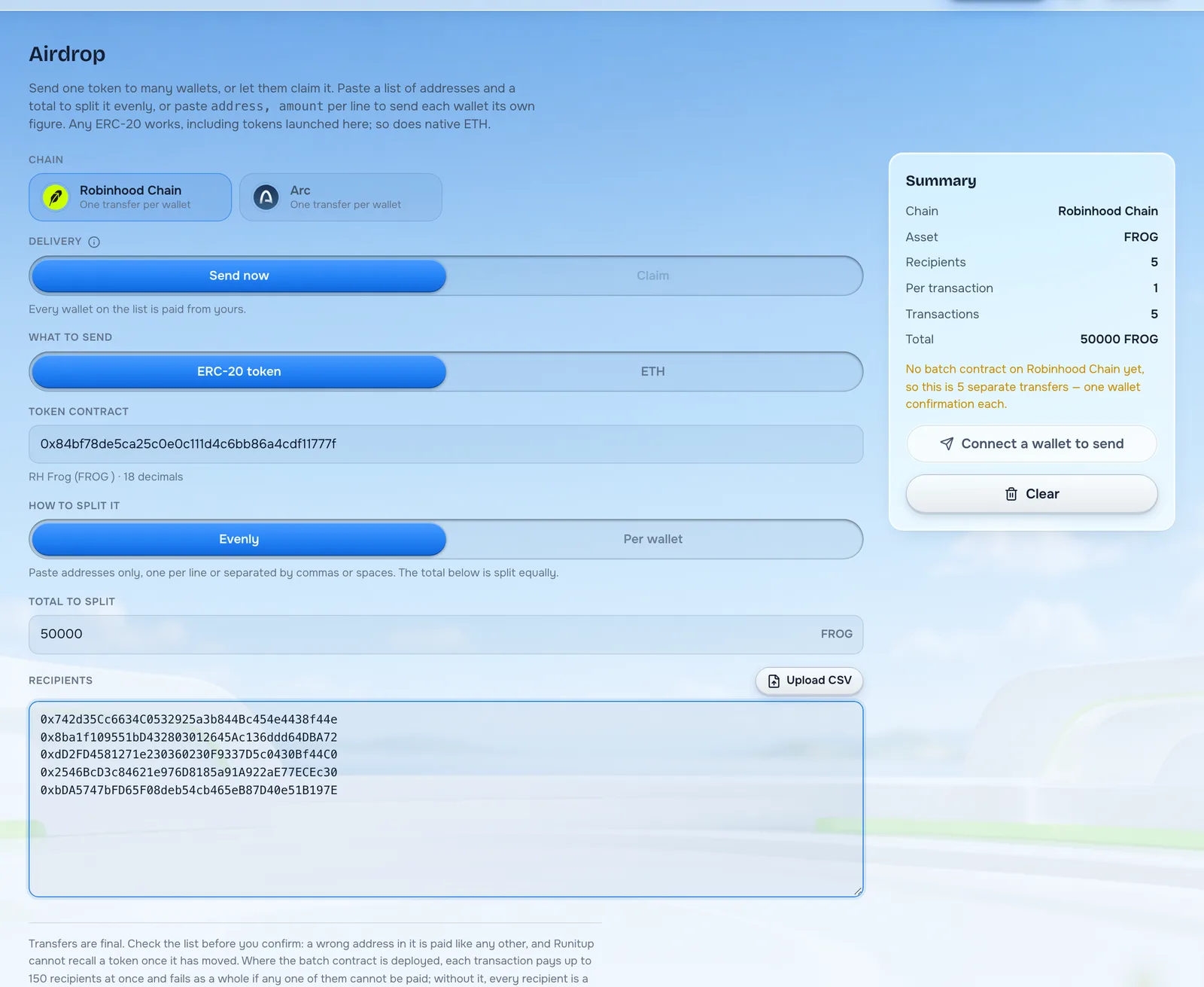
If you choose a token, paste its contract address into the token contract box. The page then looks it up and confirms what it found underneath, which in the screenshot above reads "RH Frog (FROG) · 18 decimals".
Check that line. It is the difference between sending your coin and sending something with a similar name that you did not mean to touch. If the name that appears is not the one you expected, you have the wrong address.
If you choose ETH instead, there is no contract to paste. You are sending the chain's own currency, the same thing you pay gas in.
Step four: choose how to split it
This is where you decide who gets what, and there are two ways to do it.
Splitting evenly
Choose Evenly, paste your addresses, and put a total in the box. The page divides that total equally between everyone on the list.
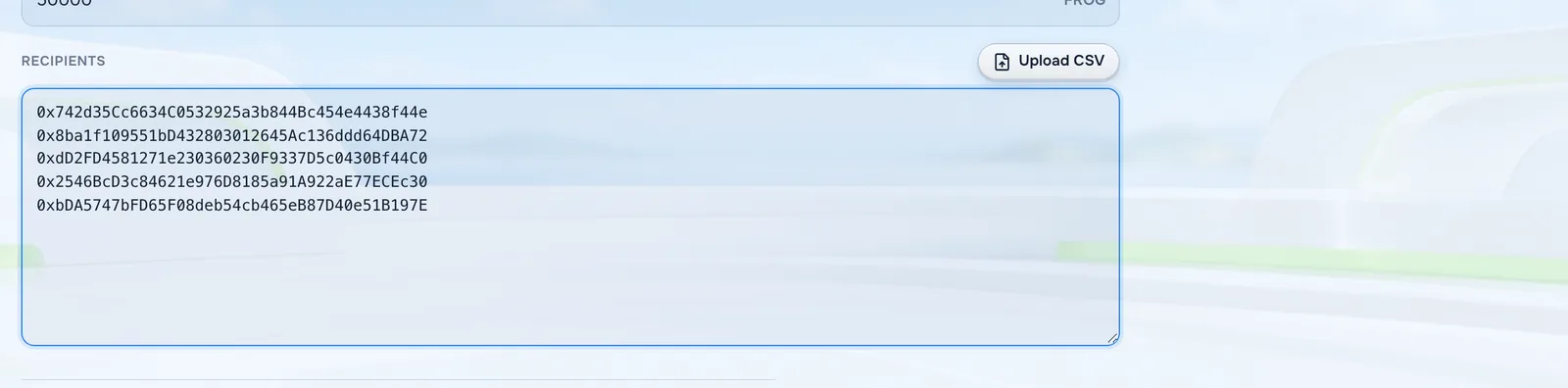
Addresses can be one per line, or separated by commas or spaces. The page is relaxed about formatting, which matters when your list came out of a tool that formats things its own way.
This is the mode for "fifty thousand tokens, split between these two hundred holders". You do the thinking once and the page does the arithmetic.
Giving each wallet its own amount
Choose Per wallet when people should get different amounts, which is usual if you are rewarding by contribution or by how much somebody held.
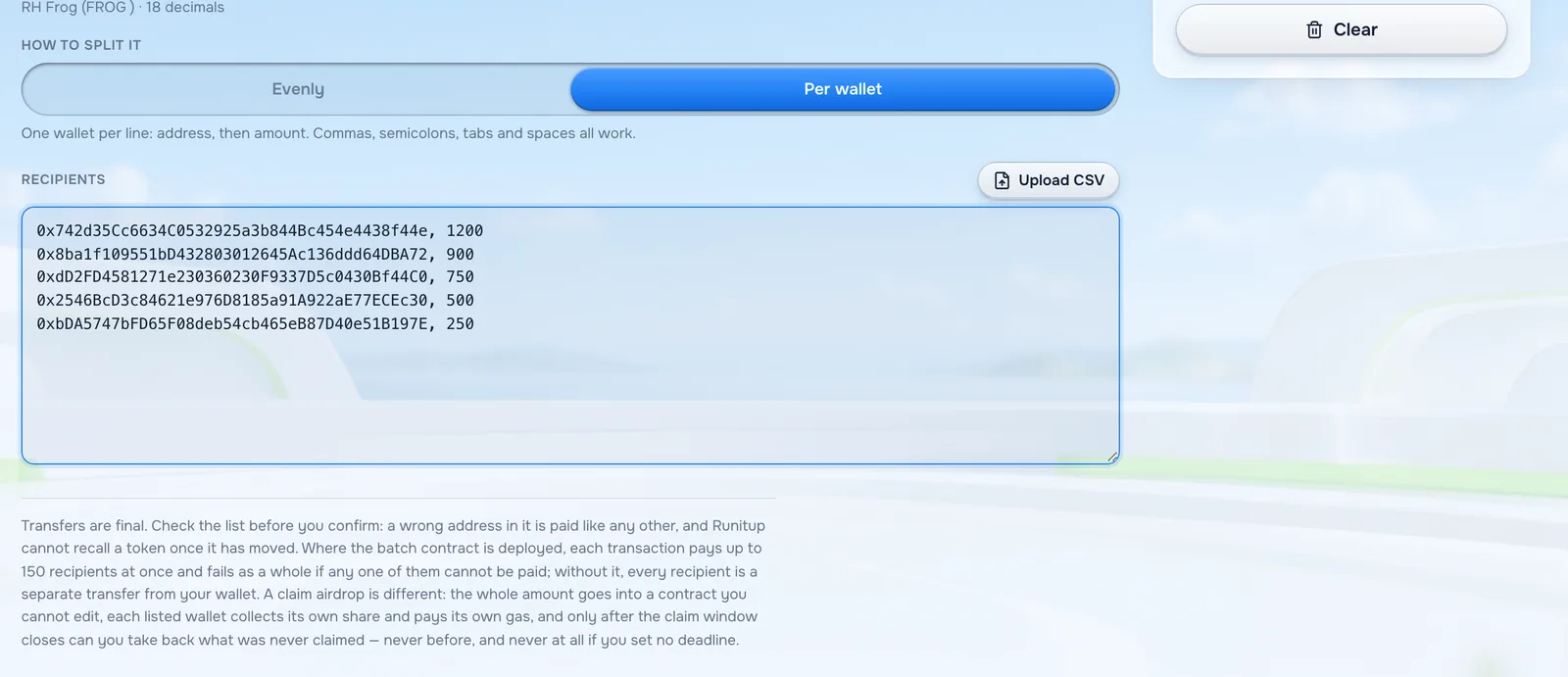
Each line is an address, then the amount. As the hint on the page says, commas, semicolons, tabs and spaces all work as the separator, so a list copied from a spreadsheet generally just pastes in.
Uploading a CSV file instead
There is also an Upload CSV button if your list lives in a file, which is usually where a real list ends up. Same idea as pasting, with less pasting.
A CSV file is just a spreadsheet saved as plain text, with one row per line. Put the address in the first column and the amount in the second, export it from whatever you keep your records in, and hand the file to the page. Anything your spreadsheet exports normally will do.
If a line is wrong, the page tells you which line and what is wrong with it, rather than failing at the end with one unhelpful error. Fix the flagged lines and the warning clears.
Step five: check the panel before you confirm
The panel on the right is the part to actually read. It shows the chain, the asset, how many recipients it found, how many transactions this will take, and the total leaving your wallet.
That recipient count is your spell-check. If you pasted two hundred addresses and the summary says one hundred and ninety-eight, two lines are malformed and you want to know that now rather than afterwards.
The summary also carries a warning worth understanding, which in the screenshot reads: "No batch contract on Robinhood Chain yet, so this is 5 separate transfers, one wallet confirmation each."
What "one wallet confirmation each" really means
Take this seriously before you plan a large airdrop. Today, on Robinhood Chain, every recipient is a separate transfer, and each one needs its own confirmation in your wallet.
Five recipients means five confirmations. Two hundred recipients means two hundred confirmations, and a long evening. The page is being honest with you rather than hiding it, but it does mean a very large list is painful right now.
Where a batch contract is available, the page says so, and each transaction pays up to one hundred and fifty recipients at once. On a chain without one, it is one at a time.
If your list is long, the practical advice is to do it in sittings, or to wait for claim mode, which moves the work to the recipients.
What you cannot undo
Transfers are final. That sentence is on the page for a reason and it deserves repeating here.
A wrong address on your list is paid exactly like a correct one. Runitup cannot reverse it, the recipient is under no obligation to send it back, and there is no support ticket that fixes it. The only defence is checking the list before you confirm.
This is why the recipient count in the summary matters, and why sending a small test batch first is never wasted effort. Send to two wallets you control, confirm they arrived, then do the real list.
Sensible habits before a big airdrop
A few things that cost nothing and save real trouble.
Test with a small amount first. Two addresses, a token each, confirm both landed. It takes two minutes.
Keep the list somewhere you can check afterwards, and read our note on collecting fees if the airdrop is funded from what your coin has earned. A CSV file you still have is how you answer "did you actually pay me?" without guessing.
Check you have enough of the token and enough gas. The transfer pays in your token, the network charges gas in ETH, and running out halfway through a long list leaves a half-finished airdrop.
Send from a wallet you are happy to have publicly associated with the coin. Every one of these transfers is visible forever on the Robinhood Chain explorer, and people will look at where they came from.
Decide what you will say. An airdrop nobody was told about mostly gets sold by people who assume it is spam.
After you send
The transfers appear in each recipient's wallet without them doing anything, and on the explorer immediately. There is no pending state to manage and nothing further for you to confirm.
Two things happen next that catch people out. Some recipients will not see the token until they add it to their wallet by contract address, because wallets do not always show a token they have never heard of. And some will sell it within the minute, which is normal and not worth taking personally.
Tell people it happened. An airdrop nobody announced looks like spam arriving in a wallet, and spam gets sold or ignored. A short post saying what the airdrop was for, who got it and why, turns the same transfers into something people talk about.
Questions people ask about sending an airdrop
Does it cost anything to use the page?
The page itself does not charge you. You pay the network's gas for each transfer, and the tokens obviously come out of your own balance.
Can I airdrop a coin I launched here?
Yes. Any ERC-20 on the supported chain works, and a coin launched on Runitup is an ordinary ERC-20. Paste its contract address in the token box.
Can I send ETH instead of a token?
Yes. Choose ETH under what to send, and skip the contract box entirely.
What happens if one address is invalid?
The page flags the line before you send. Lines it cannot read are reported with a line number so you can fix them, rather than the whole thing failing at the end.
How many wallets can I send to at once?
There is no cap on the list itself. The practical limit is your patience, because on a chain without a batch contract each recipient is a separate confirmation.
Do recipients pay anything to receive it?
Not when you use send now. The tokens simply arrive and you paid the gas. A claim airdrop is the opposite: the recipient pays gas to collect.
Can I take the tokens back afterwards?
No. Once a transfer confirms it belongs to the recipient. This is true of every token transfer on every chain, not a Runitup rule.
Can I airdrop to holders of somebody else's coin?
Nothing stops you, and it is a common way to reach an audience that already trades. Take the holder list from the explorer, trim it, and send. Expect a lower response than from your own community, because those wallets never asked for it.
Should I airdrop before or after launching?
After, in almost every case. Before the coin exists there is nothing to send, and an airdrop into a pool with no liquidity gives recipients something they cannot sell, which reads as a broken promise rather than a gift.
When will claim airdrops be available?
They are built but not switched on for these chains yet. The button will stop being greyed out when they are.
When your list is ready and checked, the airdrop page does the rest, and if you have not launched the coin yet, the launch page is the place to start.